How modern report navigation can save you hours per transaction

How modern report navigation can save you hours per transaction

Your commercial search might be missing these elements

Clear report navigation saves you hours per transaction and ensures a smooth workflow and supports good time management. 

For property lawyers, good time management delivers multiple benefits. When your time is well-managed, you’re able to research cases thoroughly, remain productive across your workload, and communicate better with clients.

Having access to clearly presented reports for commercial property transactions – those designed with intuitive navigation, good structure, and meet the demands of your workflow – is crucial to making the most of your time and productivity. Groundsure’s commercial reports are designed to meet the diverse needs of commercial property transactions. They take large and complex environmental data and turn it into clear and simple insights. 

“We know that our clients’ time is valuable, so one of our core design goals is to make their job as easy as possible. A key part of this is ensuring our reports are intuitive and easy to navigate. Our enhanced design delivers this exceptionally well: key risks are clearly identified on the front page, while guidance, next steps, and more detailed information are just a click or two away – via hyperlinks. Our new navigation bar at the top of every page, allows seamless navigation through every chapter of the report. This makes it easy to explore the report in full.” 

Steven Watt, Product Manager at Groundsure. 

Get to know the front page design of a Groundsure report 

We conducted market research with over 20 commercial property solicitors to better understand the user needs, design preferences and real-world workflow. 

The research showed that property professionals use the front page of the report as a central hub. As a result, from the moment that you receive the Groundsure report, 

you’ll find the enhanced front page layout is intuitive and easy to work with – giving you immediate access to all the information you need. 

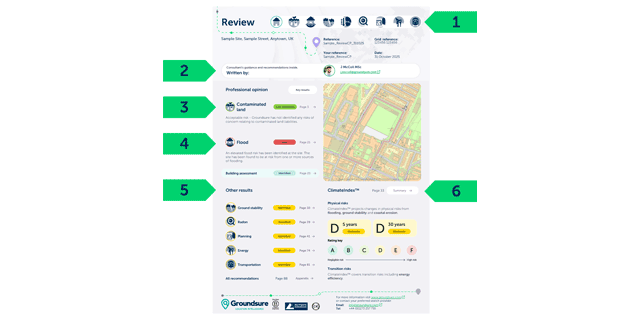
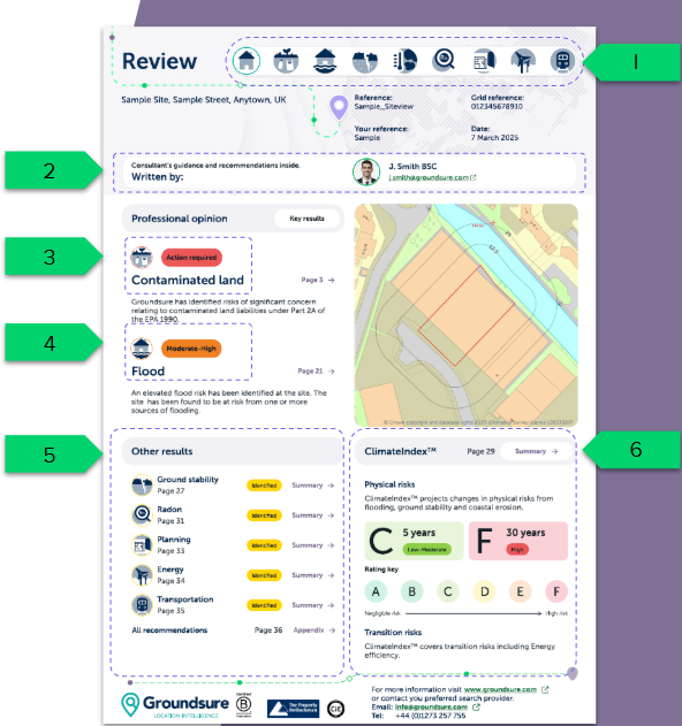
An example of our commercial search report – Review 

1). Top line navigation bar – links to each summary page. The home icon returns you back to the front page of the report 

2). Report author, their photo and contact details are included 

3). Key risks contaminated land and flood risks are given prominence

4). The site plan is included for context  

5). Other results are provided in the second half of the page  

6). Colour-coded risk pills for assessments

Maps and data are included only where risks are identified. Although we made improvements for digital navigation, we’ve also kept the reports in a printable format – to ensure everyone’s workflow is considered. 

Don’t just take our word – our customers explain the benefits

Groundsure provides outstanding quality in both reports and data, giving us complete confidence in our reporting to clients and decision-making. The clarity and accuracy of their reports make complex information easy to understand, saving time and reducing risk.” 

Claire-Petricca-Riding, Partner, Head of Planning and Environment, Irwin Mitchell LLP. 

Essential elements for clear report navigation to save you time

We designed the user journey throughout the report to be seamless, with clear, chaptered structures covering: summary, risk assessment, maps and data, and next steps.  

  • Smooth navigation bar transitions – follows the same order as the report. Teal-highlighted visual icons show your current location at a glance, and each icon links directly to the summary page of its chapter 
  • Subsections for quick access – jump straight into the areas and risks that matter to you the most. Enabling quick access to key insights, without unnecessary scrolling 
  • Colour-coded risk pills – the ultimate visual clarity. Risks are highlighted with colour coding for each assessment  – allowing you to identify areas of concern instantly. 
  • Expert consultant support – included as standard. All reports feature the name and contact details of the consultant who authored the report. This helps resolve queries quickly and avoids misunderstandings or confusion. 

Industry-led report navigation

Groundsure reports provide industry-leading report navigation. Use the hyperlinks for seamless page transitions – they’re designed with the user in mind. 

Enhanced layouts 

Enhanced layouts help you navigate the report smoothly and efficiently. Use the folder tabs to navigate the sections with ease and return-to-summary option.  

Siteview 

A simple and efficient check of core compliance issues for contaminated land. Ideal for small commercial premises. (Excluding redevelopment).

Review

Ideal for commercial property transactions including complex deals and redevelopment sites. 

Screening 

Ideal for less complex commercial property transactions and multil-site portfolios (excluding redevelopment).

If you need any support or further information, contact our Customer Support team on 01273 257755 or info@groundsure.com  

Share:

Date:
Jan 28, 2026

Author:
Amanda Bown